A live map, quest tracker and timers for Project 1999, read from your log file.
Free for Windows. Thudfoot reads the log EverQuest already writes, and nothing else, and turns it into a map
with every zone's NPCs, Epic checklists that tick themselves off, spell timers, a DPS meter and a corpse tracker.
A new ogre-eye icon and a cleaner, redesigned main window.
P99 Wiki pages for NPCs, items and quests open inside the app.
About 1,700 more NPCs, merchants included, now have a spot on the map.
Mobs the wiki can't place show spots learned from your logs and from other players' logs.
eqlog_Thudfoot_project1999.txtWhat each line becomes
[Sat Oct 17 21:04:12 2026]You have entered Blackburrow.
The map switches to Blackburrow
[Sat Oct 17 21:04:15 2026]Your Location is -142.09, 37.50, -11.25
Your dot moves; other floors dim
[Sat Oct 17 21:05:02 2026]You begin casting Disease Cloud.[Sat Oct 17 21:05:05 2026]a gnoll doubles over in pain.
A Disease Cloud timer starts on the gnoll
[Sat Oct 17 21:05:09 2026]You slash a gnoll for 12 points of damage.
The hit counts toward this fight's DPS
[Sat Oct 17 21:06:47 2026]--You have looted a Gnoll Fang.--
A tracked quest step that needs it ticks off
[Sat Oct 17 21:09:15 2026]You have been slain by a gnoll!
Your corpse is saved with its spot, rez and decay timers
What it does
One window beside EverQuest, plus a map overlay and a timers HUD that sit on top of the game.
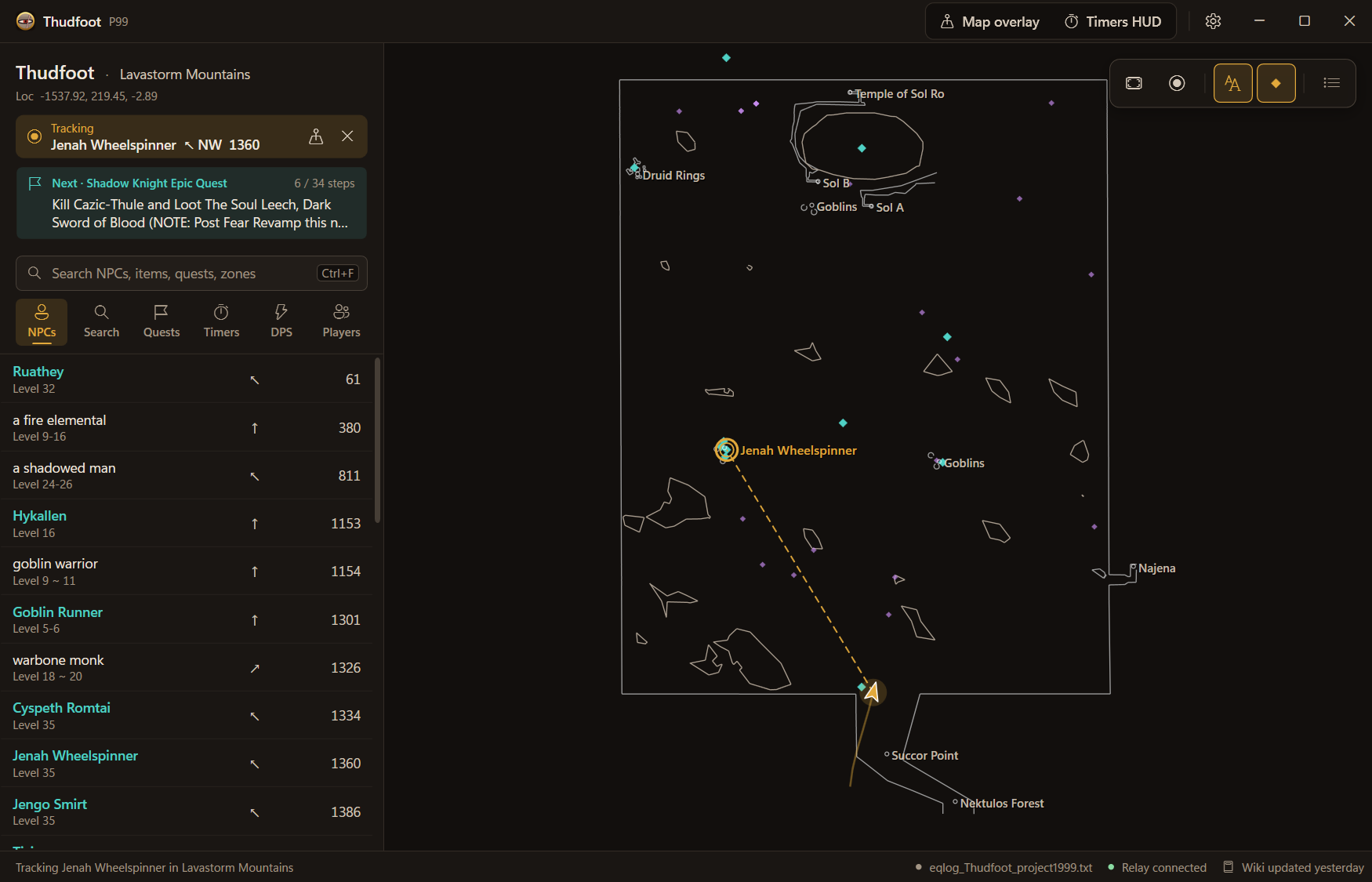
The main window tracking an NPC: a guide line to her spawn on the map, her direction and distance at the top of the sidebar, and the zone's NPC list below.
Find your way
Know where you are, what's around you and where the mob you need spawns.
Live map
Follows your /loc, switches maps as you zone, shows your heading and trail, and dims the other floors in dungeons like Blackburrow and Cazic-Thule.
Overlay
A click-through map on top of EverQuest that follows you at the same zoom in every zone. Ctrl+Alt+L switches click-through.
Zone NPCs
Every NPC and merchant the P99 Wiki records for your zone, with level, direction and distance, like a tracking window without the skill. Pick one to get a guide line to it.
Spawn points
Where the wiki has no location: optional TAKP spawn points, spots learned from your own logs, and spots other players' logs learned. Other Thudfoot users in your zone can show on the map too.
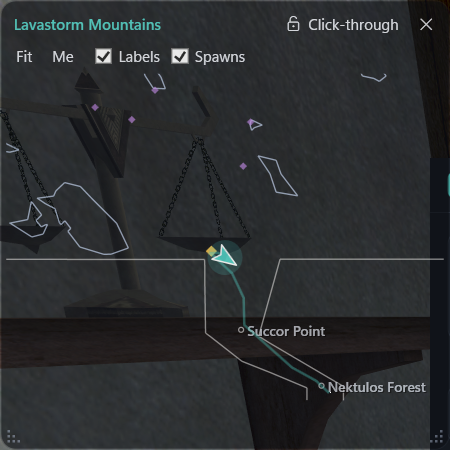
The overlay on top of EverQuest in Lavastorm Mountains.
Quests and loot
See every step of your Epic and where each item drops, without alt-tabbing to the wiki.
Epic and quest checklists
Every step and every item for your class Epic. Steps tick off as your log shows you loot, forage and kill, and Items needed shows where each item comes from.
Item and loot search
Search any item to see every mob that drops it, where, and roughly how often. Open an NPC to see its loot.
Wiki pages in the app
NPC, item and quest pages from the P99 Wiki open in a pane over the map.
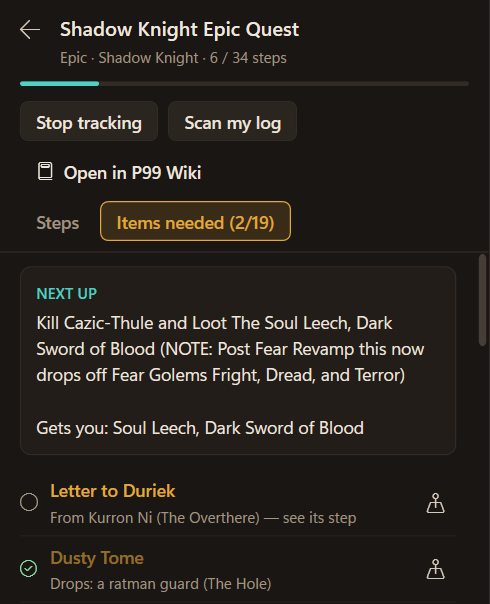
An Epic checklist: the next step, and where every item you need comes from.
Combat
Know what's running, what's about to fade and how the fight went.
Spell timers
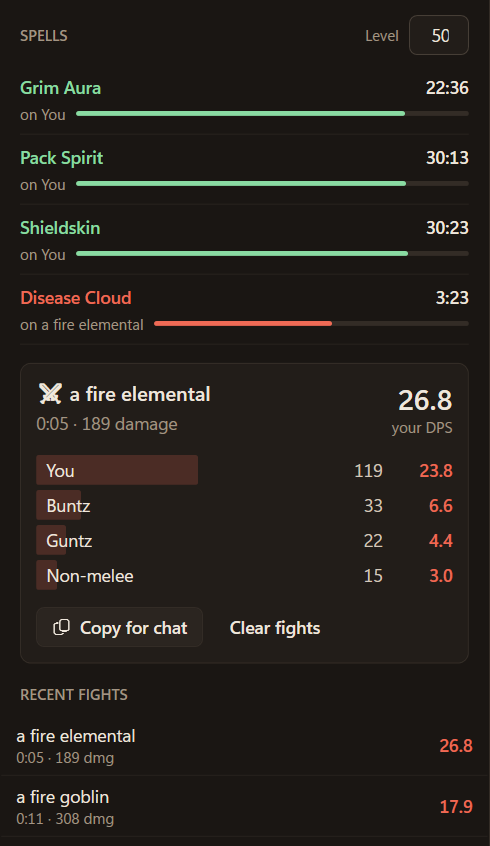
Buffs and debuffs with real durations from your spells_us.txt, in the app or in a compact HUD over the game.
DPS meter
Each fight's damage for you, your group and pets, with a one-line summary you can paste into chat.
Respawn timers
Start when your log shows a kill of an NPC whose respawn time is on the wiki.
The Timers and DPS tabs. The same timers and DPS also run in a compact HUD over the game.
Safety net
Died somewhere awkward? The app remembers where, and how long you have.
Corpse tracker
Where you died, the 3-hour rez-for-exp window (logged-in time only, as P99 counts it) and the 7-day decay. It finds deaths from the last 7 days, even ones from while it was closed.
Corpse · Lower Gukdied 21:09
Rez for exp1:52:10 left
Decays in6d 23h
Illustration of the corpse card in the app's sidebar.
Fair play on Project 1999
P99's rules ban programs that interact with the EverQuest client (MacroQuest, ShowEQ and the like).
Programs that only read the EverQuest log files are allowed, as long as they don't control your character for you.
It reads
Your log files, Logs\eqlog_*.txt
spells_us.txt, for spell durations
Map files, maps\*.txt
eqclient.ini, to check logging and windowed mode
All in your EverQuest folder, the way Notepad would. It writes only to its own folder in %AppData%.
It never
Reads or changes game memory
Injects into or hooks the game
Sends keys or clicks to EverQuest
Automates anything
Changes files in your EverQuest folder
The overlays are ordinary windows drawn on top.
It connects to
The P99 Wiki, for NPC, quest and item pages
GitHub, for the map pack
This site, for updates and, if you ask for them, TAKP's spawn points
Microsoft, only to install the .NET 10 Desktop Runtime if your PC lacks it
Thudfoot's relay, to show other Thudfoot users in your zone. That sends nothing about you until you turn on Share my location.
Thudfoot's relay, for NPC spots your logs learn: only each NPC's name, zone and rough spot. On by default; untick it in Setup.
Rules can change and only P99 staff can rule on a tool. Check the
current server rules or ask a GM if in doubt.
Download and install
Free, and no account needed.
Thudfoot 0.5.6
Installer
11 MB. Installs for your Windows user only, with no admin needed, and updates itself.
Portable zip
4 MB. Unzip and run, with no installer.
Requires
Windows 10 or 11, 64-bit, and the .NET 10 Desktop Runtime. Setup offers to install it from Microsoft.
If the .NET 10 Desktop Runtime isn't on your PC yet, Setup offers to install it from Microsoft first.
On first start, the setup screen finds your EverQuest folder and checks logging and windowed mode.
Download the P99 Wiki data (a few minutes, once) and the map pack from the same screen.
In game, type /log on once and bind /loc to a key you press often, so the map stays current.
Playing in full screen? See how to set it up.
Questions
The things P99 players ask first.
Is this allowed on P99?
P99's rules ban programs that interact with the EverQuest client. Programs that only read the log files are allowed, as long as they don't control your character for you.
Not in exclusive full screen: Windows can't draw any window over a game there without injecting into it, and P99 doesn't allow that.
EverQuest's windowed mode at your screen's resolution looks the same, and the overlay and HUD sit on top:
Close EverQuest and open eqclient.ini in your EverQuest folder.
Set WindowedMode=TRUE, and set WindowedWidth and WindowedHeight to your screen's resolution.
Start EverQuest, open the map overlay or timers HUD, place them, and turn on Click-through. Ctrl+Alt+L switches it for both.
Why does Windows SmartScreen warn?
The installer isn't code-signed yet, so Windows doesn't know the publisher and warns on the first run. Click More info, then Run anyway.
On PCs with Smart App Control turned on, Windows may block unsigned apps entirely.
What does it send over the network?
It downloads public P99 Wiki pages, the map pack from GitHub, updates from this site and, if you ask, TAKP's spawn points.
It also connects to Thudfoot's relay to show other Thudfoot users in your zone, which sends nothing about you. Two things can go out from your side:
Share my location, off until you turn it on: your zone, /loc, heading, status and your character name, or “Adventurer” if you hide it. Nothing is stored, and your dot disappears 2 minutes after your last update.
Shared NPC spots, on by default: for NPCs your logs place, only the NPC's name, its zone and the rough spot. Never your character or when you were there. Untick it in Setup to stop, and forgetting learned spots takes back what you sent.
Your logs, learned sightings and quest progress stay on your PC.
How do updates work?
Installed copies check this site when they start and show an Update button when a new version is out. Check for updates on the Setup screen does the same on demand.
Updates download only what changed, and your settings, wiki data and progress stay as they are.
Does it work with other EQ servers?
It's made for Project 1999. It reads the logs of all three P99 servers (Blue, Green and Red), and players only see others on the same server.
The NPC, quest and loot data come from the P99 Wiki and the corpse timers follow P99's rules, so on other EverQuest servers much of it would be wrong.